Your solar generator usually charges slowly because it is receiving fewer usable solar watts than expected. Weak sunlight, shade, poor panel positioning, input limits, running appliances, temperature protection, or battery charging controls can all reduce the actual charging speed.
In this guide, I’ll help you figure out where the slowdown is happening. We’ll start with simple checks before moving into panels, cables, settings, and possible equipment problems.
Key Takeaways
- Solar panels rarely produce their full rated wattage all day.
- Clouds, shade, heat, and poor panel angles reduce solar output.
- Your generator cannot accept more than its maximum solar input.
- Running appliances can reduce power available for battery charging.
- Charging often slows naturally as the battery gets closer to full.
- Wrong panel voltage or current can limit charging performance.
- Cable problems can cause low or unstable solar input.
- Slow charging does not automatically mean your battery is failing.
How Fast Should a Solar Generator Charge?
Before looking for a problem, make sure your charging time is actually unusual. Battery size and real incoming wattage determine how long charging should take.
A simple estimate looks like this:
Battery energy needed ÷ actual charging watts = approximate charging time
For example, imagine your battery needs another 1,000Wh of energy. If the generator is receiving 200W from your panels, the basic estimate is around five hours.
Real charging normally takes longer because solar input changes throughout the day. Some energy is also lost through cables, electronics, and the charging process.
| Battery Energy to Replace | Actual Solar Input | Basic Charging-Time Estimate |
| 500Wh | 100W | About 5+ hours |
| 500Wh | 200W | About 2.5+ hours |
| 1,000Wh | 100W | About 10+ hours |
| 1,000Wh | 200W | About 5+ hours |
| 1,000Wh | 400W | About 2.5+ hours |
| 2,000Wh | 400W | About 5+ hours |
These estimates use actual incoming solar watts, not the wattage printed on your panel.
A 200W panel producing only 130W should be treated as a 130W charging source for that moment.
Why Your Solar Generator Is Charging Slowly
Slow charging can happen anywhere between the sunlight hitting your panels and energy reaching the battery. I recommend checking these causes before assuming something inside the generator has failed.
Your Solar Panels Are Producing Less Than Their Rated Wattage
One of the most common misunderstandings involves the number printed on a solar panel.
A 200W solar panel does not continuously produce 200W outdoors.
That rating comes from standardized test conditions. Your real environment changes constantly throughout the day.
Panel output can drop because of:
- Weaker morning sunlight
- Late-afternoon sunlight
- Clouds
- Haze
- Smoke
- Seasonal changes
- High temperatures
- Poor panel positioning
You may see a 200W panel produce much less than 200W while everything works correctly.
Instead of focusing only on the panel label, check the actual input wattage shown on your solar generator.
That number tells you much more about your charging speed.
Shade Is Reducing Your Solar Output
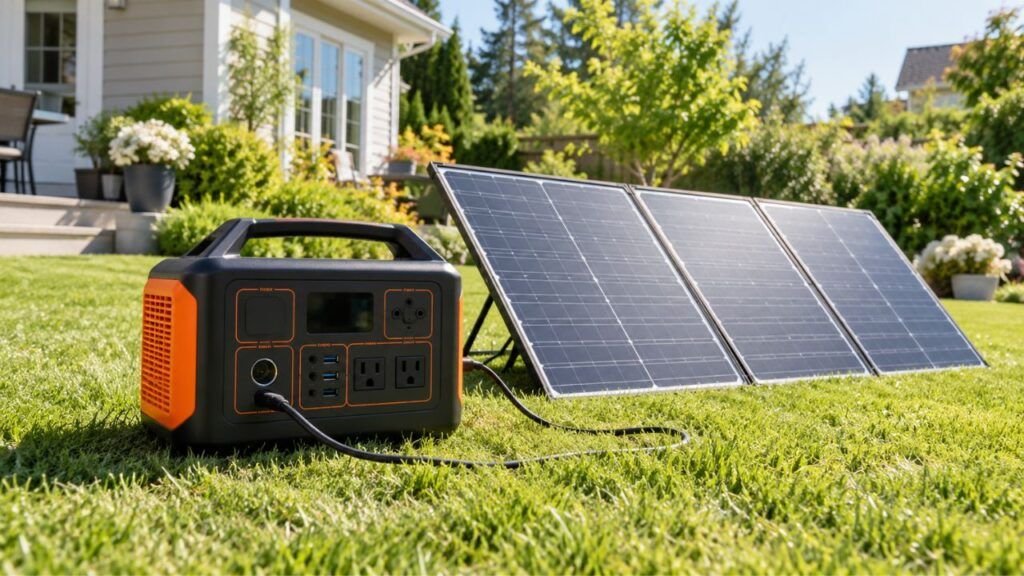
Portable solar panels need clear exposure to sunlight.
Even a shadow covering part of the panel can reduce its output. This is especially common around RVs, campsites, patios, and wooded areas.
Look for shadows from:
- Tree branches
- Buildings
- Roof vents
- Air conditioners
- Antennas
- Other solar panels
- Camping equipment
Watch the panels for several minutes because shadows move.
A panel that looked completely clear earlier may become partially shaded as the sun changes position.
If your input watts suddenly drop, inspect the panel before changing any generator settings.
Your Solar Panels Are Pointed at the Wrong Angle
Panel position has a major effect on solar production.
Sunlight hitting the panel more directly usually produces more power. A portable panel lying almost flat may perform noticeably worse when the sun sits lower in the sky.
Try adjusting the panel toward the sun and watch your generator’s input display.
You may see the wattage increase within seconds.
For long charging sessions, check the angle again later. The best position in the morning may not be the best position during the afternoon.
You do not need to chase the sun every few minutes. One or two adjustments can still improve daily energy production.
Your Panels Are Dirty or Too Hot
A dirty panel cannot receive sunlight as effectively.
Dust, pollen, dried mud, leaves, and bird droppings can reduce production. The effect may become more noticeable when dirt covers several sections.
Clean portable panels according to the manufacturer’s instructions. Avoid harsh cleaners or abrasive materials that could damage the surface.
Heat creates another issue.
Strong sunshine can make a solar panel very hot. Solar panels can actually become less efficient as their operating temperature rises.
This means a very hot panel under bright summer sunlight may produce less than you expected.
Keep the solar generator itself shaded and ventilated whenever possible. The panels still need direct sunlight, but the battery station usually does not.
Your Solar Panel Array Is Too Small
Sometimes nothing is wrong with your equipment.
You may simply have too little solar capacity for your battery size.
Imagine a 2,000Wh solar generator connected to one 100W panel. Even under favorable conditions, filling a deeply discharged battery could take most of the day or longer.
Now compare that with a 500Wh power station using the same panel.
The smaller battery requires much less energy, so it reaches full charge sooner.
This becomes especially important with large home-backup solar generators.
If you regularly discharge a large battery overnight, a small portable panel may never replace all that energy during one day.
Compare three numbers:
- Battery capacity
- Actual solar input
- Available hours of strong sunlight
Those numbers give you a more realistic picture of charging performance.
Your Solar Generator Has Reached Its Maximum Solar Input
Every solar generator has a maximum amount of solar power it can accept.
Suppose your generator accepts up to 400W of solar input. Connecting 600W worth of panels does not automatically make the battery accept 600W.
The internal charging system still limits incoming power.
Your generator may specify limits for:
- Maximum solar wattage
- Maximum input voltage
- Maximum input current
- MPPT operating voltage range
This is why adding more panels does not always make charging faster.
Before expanding your array, check your generator’s solar input specifications.
If the station is already receiving its maximum supported input, another panel may provide little or no additional charging speed.
Your Panel Voltage or Current Does Not Match the Input Properly
Solar generator compatibility involves more than panel wattage.
Voltage and current also matter.
You may see terms such as:
Voc: The panel’s open-circuit voltage.
Vmp: The voltage the panel usually operates around while producing power.
Maximum input voltage: The highest voltage your generator’s solar input can safely handle.
Maximum input current: The most current the charging circuit accepts.
MPPT range: The voltage range where the charge controller can efficiently harvest solar power.
A panel configuration outside the generator’s operating range may charge poorly or not charge at all.
For example, voltage that is too low may prevent the MPPT controller from working correctly.
Voltage that is too high can create a much more serious problem.
Never exceed the solar generator’s maximum allowed PV voltage.
If you connect multiple panels, remember that series and parallel wiring affect voltage and current differently.
Use only configurations approved for your model.
Your Cable, Adapter, or Connector Is Limiting Power
Solar power still has to travel through cables before reaching the generator.
Loose or damaged connections can reduce the amount of energy arriving at the input.
Check for:
- Loose plugs
- Bent contacts
- Damaged insulation
- Corrosion
- Dirty connectors
- Incorrect adapters
- Very long cable runs
- Undersized extension cables
- Connectors becoming unusually hot
Cable problems sometimes create unstable charging instead of consistently low charging.
You may notice the display jumping from 180W to 40W, then returning to 150W without any major change in sunlight.
If that happens, inspect the entire connection path.
Disconnect the equipment safely before examining connectors.
You Are Using Power While the Generator Is Charging
This is one of the easiest causes to overlook.
Your generator may be receiving plenty of solar power while the battery percentage still rises slowly.
The reason is simple: your appliances are using some of that incoming energy.
Imagine your panels are delivering 300W.
At the same time:
- A refrigerator uses 100W.
- A laptop uses 60W.
- Lights and small devices use another 20W.
Your connected equipment is now using 180W.
That leaves much less energy available for charging the battery.
There are also conversion and internal system losses.
So although the display shows strong solar input, the actual battery percentage may increase slowly.
Try turning off unnecessary loads for 20 to 30 minutes.
Then compare the battery charging rate.
If it improves noticeably, your solar system may be working normally.
The Battery Is Already Near Full
A battery does not necessarily charge at the same speed from empty to full.
Many modern solar generators reduce charging current as the battery reaches a high state of charge.
You may notice fast charging between:
20% and 50%
or
30% and 70%
Then charging appears slower as you approach 80%, 90%, or 100%.
The exact behavior varies between manufacturers and battery systems.
This slowdown helps the battery management system control cell voltage, temperature, and charging safety.
Therefore, slower charging near full capacity does not automatically indicate a fault.
Judge performance across the entire charging session instead of watching only the final few percentage points.
The Battery Is Too Cold or Too Hot
Battery temperature can directly affect charging.
Lithium batteries work within specific charging temperature ranges. If the cells become too cold or too hot, the battery management system may reduce charging current.
It may even stop charging temporarily.
This can happen when your solar generator sits:
- Inside a freezing vehicle
- Outside during winter
- In direct summer sunlight
- Inside a closed hot car
- Near another heat-producing appliance
- In a poorly ventilated storage area
Your panels should receive sunlight.
Your power station usually should not.
Whenever possible, keep the generator somewhere dry, shaded, and ventilated while the panels remain outside.
Check your owner’s manual for the exact charging temperature range.
Different models use different limits.
A Charging Setting May Be Limiting the Input
Some solar generators offer adjustable charging controls.
Depending on your model, you may have settings for:
- Maximum charging percentage
- Battery preservation
- Charging speed
- Quiet charging
- Scheduled charging
- Energy-saving modes
- Input preferences
These features can sometimes make charging appear slower than expected.
Open the manufacturer’s app or settings menu and check whether a limit has been enabled.
Also check for firmware updates if charging behavior changed unexpectedly.
Do not increase charging settings beyond the manufacturer’s recommendations just to gain speed.
Faster is not always safer or better for the battery.
The Solar Panel, MPPT Controller, or Battery May Have a Fault
Hardware failure is possible, but I would investigate it after the simpler causes.
A possible fault becomes more likely when the generator suddenly performs much worse under the same conditions.
Warning signs include:
- Solar input repeatedly falling to zero
- A panel producing far less than before
- Charging stopping without obvious shade
- Error messages or fault codes
- Unusual heat around connectors
- Burnt or discolored plugs
- Normal sunlight but consistently tiny input
- Multiple compatible panels showing the same problem
- Slow charging from both solar and AC power
If several simple checks fail, contact the manufacturer or a qualified service technician.
Avoid opening the battery enclosure yourself.
How to Find the Cause of Slow Solar Charging
The easiest way to diagnose slow charging is to isolate one variable at a time. Start with the simple checks before changing panels, wiring, or equipment.
- Check the input wattage. Look at the solar watts displayed on your generator.
- Disconnect unnecessary appliances. See whether the battery begins charging faster without loads.
- Test around strong midday sunlight. This gives you a better comparison than testing early morning.
- Remove all shade. Make sure no branches, buildings, or equipment cover the panels.
- Adjust the panel angle. Move the panel toward the sun and watch the input change.
- Clean the panels. Remove visible dirt according to manufacturer instructions.
- Check the generator’s solar specifications. Confirm maximum watts, voltage, current, and MPPT range.
- Inspect cables and adapters. Look for loose, damaged, dirty, or overheating connections.
- Check battery temperature. Move the station to a safer temperature if needed.
- Check the battery percentage. Charging near full may naturally become slower.
- Try another compatible cable or panel. This can help isolate a faulty component.
- Compare solar charging with AC charging. The comparison can narrow down the problem quickly.
If AC charging works normally but solar charging remains slow, focus on the panels, sunlight, cables, connectors, and PV input.
If both AC and solar charging are unusually slow, look more closely at battery temperature, charging settings, the BMS, or the power station itself.
How to Make a Solar Generator Charge Faster
Once you know the likely cause, improving charging speed is usually straightforward. Focus on increasing usable solar input without exceeding your generator’s limits.
- Place your solar panels in unobstructed direct sunlight.
- Reposition portable panels as the sun moves.
- Keep the panel surface clean.
- Reduce unnecessary appliance loads while charging.
- Add compatible solar capacity if your generator supports it.
- Stay within the allowed voltage and current limits.
- Use proper solar cables and compatible connectors.
- Avoid unnecessarily long cable runs.
- Keep the power station shaded and ventilated.
- Allow an overheated or very cold battery to normalize.
- Check charging settings in the manufacturer’s app.
- Install recommended firmware updates when available.
The goal is not simply to connect the largest panel possible.
You want the generator to receive as much usable and compatible solar power as it can safely accept.
Will Adding More Solar Panels Make It Charge Faster?
Adding more solar panels can make your solar generator charge faster, but only when the generator can accept the additional power.
Suppose your current 200W array produces around 140W during good sunlight. Moving to a properly configured 400W array could significantly increase your charging rate.
However, there is still a ceiling.
If your generator accepts a maximum of 300W solar input, it cannot suddenly charge at 500W because you connected a larger array.
Extra panel capacity can sometimes help maintain stronger input during imperfect sunlight. However, voltage and current must remain within the manufacturer’s limits.
Be especially careful when connecting panels in series.
Series connections increase voltage.
Parallel connections increase current.
Never design a multi-panel configuration using wattage alone.
Check the generator’s solar input specifications first.
Why Does Solar Charging Take Longer Than Wall Charging?
Wall charging is normally more consistent than solar charging.
A household outlet can provide relatively stable electrical power. Solar panels depend on environmental conditions that change throughout the day.
Solar input can vary because of:
- Passing clouds
- Sun angle
- Panel temperature
- Shade
- Time of day
- Seasonal sunlight
- Dirt on the panel
Your wall charger may provide several hundred watts continuously.
A solar array rated for similar power may only reach that level during favorable conditions.
That does not necessarily mean anything is wrong.
Solar charging simply has more variables.
When Slow Solar Charging Is Normal
Not every slow charging session needs troubleshooting. Several common situations naturally reduce charging speed.
Slow charging can be normal when:
- The battery is already near full.
- You are using a small solar panel.
- The sky is cloudy or hazy.
- You are charging early in the morning.
- You are charging late in the afternoon.
- Appliances are running from the generator.
- The battery is managing temperature.
- Your panel is very hot.
- Your generator has reached its solar input limit.
- Winter provides fewer strong sunlight hours.
Try comparing performance under similar conditions before deciding something has failed.
One slow afternoon does not tell you much.
Repeated low input during strong sunlight is more useful evidence.
When Should You Suspect a Problem?
A genuine problem becomes more likely when charging changes suddenly or remains abnormally weak under good conditions.
Look more closely when:
- Solar charging suddenly becomes much slower than before.
- Input stays extremely low under strong midday sun.
- Solar wattage repeatedly jumps between normal and zero.
- A connector becomes unusually hot.
- The generator displays an error message.
- A previously reliable panel stops performing normally.
- Different compatible panels produce the same poor result.
- Solar charging repeatedly stops without obvious shade.
- AC charging has also become unusually slow.
Stop using equipment if you notice burning smells, melted connectors, smoke, swelling, or abnormal battery heat.
Contact the manufacturer or a qualified technician for internal battery or charging-system problems.
Final Verdict
Your solar generator probably charges slowly because less usable power is reaching the battery than you expect. Weak sunlight, poor panel positioning, shade, cable losses, input limits, running appliances, and temperature controls are more common causes than battery failure.
Start by checking the actual solar input wattage on the display. Then remove loads, improve panel positioning, confirm compatibility, and inspect the cables. That simple process can often identify the problem without replacing anything.
Related FAQs
Why Is My 200W Solar Panel Only Producing 100W?
A 200W panel reaches its rated output only under specific test conditions. Heat, sun angle, haze, clouds, dirt, and partial shade can easily reduce real-world production to around 100W or another lower figure.
Why Does My Solar Generator Charge Faster at Some Times of Day?
Solar intensity changes throughout the day. Your panels usually produce more power when sunlight hits them directly, so charging may be much faster around midday than during early morning or late afternoon.
Why Does Solar Charging Slow Down After 80%?
Many solar generators reduce charging current as the battery approaches full capacity. The battery management system may taper the charging rate to control cell voltage, temperature, and battery protection.
Can I Use a Higher-Wattage Solar Panel With My Solar Generator?
You often can use a higher-wattage panel, but its voltage and current must remain compatible with the generator’s solar input specifications. Never exceed the maximum PV input voltage stated by the manufacturer.
Will Two Solar Panels Charge My Solar Generator Twice as Fast?
Not necessarily. Two panels can increase available solar power, but charging speed still depends on sunlight, panel configuration, battery conditions, and the generator’s maximum solar input limit.
Does Running Appliances While Charging Slow the Battery Down?
Yes. Appliances consume some of the incoming solar energy before it can increase the battery’s stored charge. Heavy loads can make the battery percentage rise very slowly even when solar input looks strong.
Can Cold Weather Make a Solar Generator Charge Slowly?
Yes. Lithium batteries may accept less charging current when they become very cold. Some battery management systems can stop charging completely below their safe charging temperature.
Can Hot Weather Reduce Solar Charging Speed?
Yes. High panel temperatures can reduce solar output, while excessive battery temperature can cause the BMS to limit charging. Keep the generator shaded and ventilated while leaving the panels exposed to sunlight.
How Do I Know If My Solar Panel or Solar Generator Is the Problem?
Test the generator with another compatible panel or cable if possible. You can also compare solar charging with AC charging. Normal AC charging with poor solar charging usually points toward the panel or solar-input side.
Is It Normal for Solar Input Wattage to Keep Changing?
Yes. Small changes are completely normal because sunlight, clouds, temperature, and panel angle constantly change. Large repeated drops to zero under steady sunlight may indicate a connection or equipment problem.

Austin Parker writes practical generator how-to guides, troubleshooting advice, and buying guides for solar, portable, and fuel-powered generators. His focus is helping readers solve common power problems, understand their options, and choose dependable equipment for real-world use.